Simulator User Reference
This document has the reference for all of the user views supported by tmtility when in simulator mode. Each view has the name of the view, navigation buttons, and the release version at the top of the view. Admin Guide can be clicked to see the top level of this documentation.
[Simulation] Results view
Results view in simulator mode is used to control the playback of simulation events and practice using the tmtility user interface which would be seen on race day.
The standard Results view controls and display is found at tmtility Operation (scanner connected)
The view has the following simulation controls:
- Simulation:
select a simulation to play back events from
- Start Time:
set the start time for the simulation playback
- Play:
start playback of the simulation events from the set start time. The simulation can be paused by clicking the Pause button.
- Pause:
shown when a simulation isn’t playing, pause playback of the simulation events – restart the simulation by clicking the Play button again
- Stop:
stop playback of the simulation events. This should be clicked only when the user wants to end the simulation playback. The simulation run is scored at this time.
- Fast Backward:
reduce the speed of the playback of the simulation events by a factor of 2x each time this button is clicked, down to a minimum of 1/8x speed
- Fast Forward:
increase the speed of the playback of the simulation events by a factor of 2x each time this button is clicked, up to a maximum of 8x speed
The view has the following simulation filters:
- Run:
when Play is clicked, a new run is created for the simulation playback and the filter is set to this value
if a previous run is to be viewed, select the desired run from this filter
The view has the following simulation indicators:
- Playback Speed:
shows the current playback speed (1x is real time)
- Playback Status:
shows whether the simulation is
stopped - in between runs, waiting for Play to be clicked
running - currently simulating events
paused - playback is currently paused, click Play to resume
finished - playback has completed, waiting for Stop to be clicked to score the run
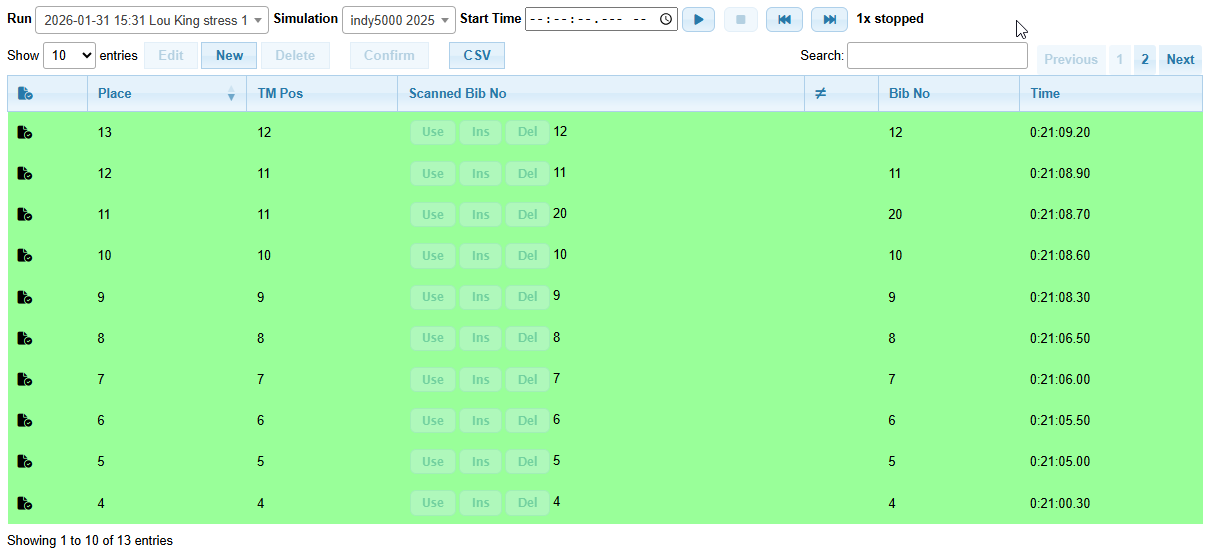
Results view in simulator mode